
Núcleo Cordis
The Cordis kernel manages plugins: installing, uninstalling, and dependencies. Agent capabilities live in these plugins.
Developer preview · 0.1.2-rc.1
Models, tools, skills, sessions, sandboxes, storage, loops, scheduling y la UI son cada uno un plugin que puedes cambiar o recomponer.
La Web UI se enlaza a 127.0.0.1:3080 con npx @deepseek-ai/dsh web. Licencia MIT. Node.js ^22.19.0 o >=24. El CLI descomprime a 43 KB en 0.1.2-rc.1.

Agent + model = Harness
HARNESS
The model is the soul of an agent.
Un harness deja que el agente lea su entorno, llame tools y siga trabajando fuera del chat.
The Cordis kernel manages plugins: installing, uninstalling, and dependencies. Agent capabilities live in these plugins.
Plugins provide every agent capability, including models, tools, skills, sessions, sandboxes, storage, loops, scheduling, and the UI. Cordis services and events let the plugins work together.
Developers can select, swap, or extend any capability in configuration without changing the DeepSeek Harness source code.
Arquitectura del producto
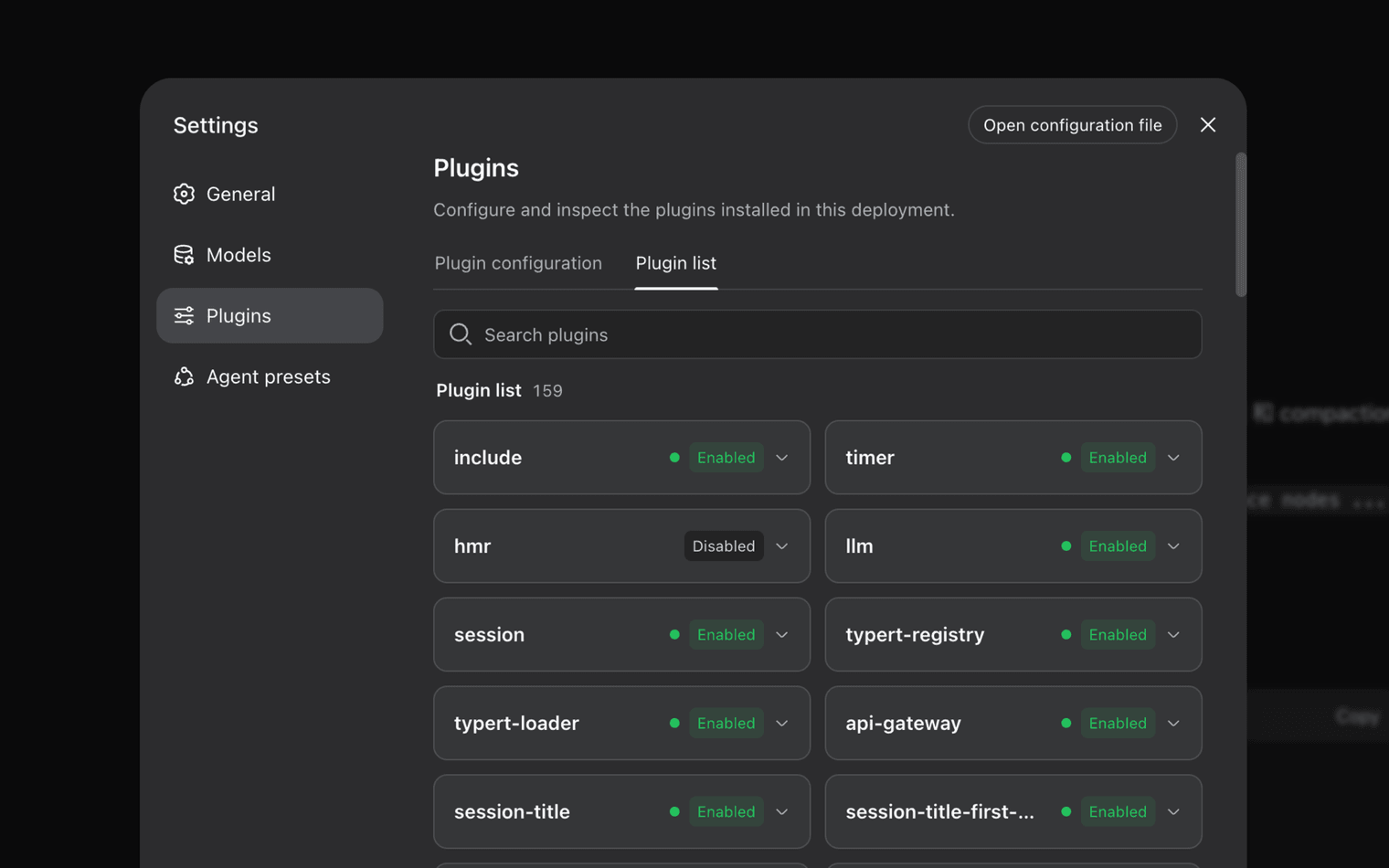
DeepSeek Harness está construido sobre Cordis. Los plugins aportan models, tools, skills, sessions, sandboxes, storage, loops, scheduling y la UI. Los desarrolladores eligen o extienden una capacidad en configuración en vez de hacer fork del árbol. El frame oficial de Settings lista 159 filas instaladas.
Registro de sesión
Everything the model sees is recorded in an append-only session log: system prompts, reasoning, tool calls and results, subagent scheduling, and every context injection. In the Trajectory view, you can inspect these records by source. Resume, fork, search, and replay all operate on the same event stream.
Presets de runtime
Standard mode includes the full toolset. Code / PTC mode uses model-generated code to orchestrate multiple rounds of tool calls. Minimal mode keeps only a shell tool and a file editor for benchmarking models in a thin environment. Creator mode lets you inspect the current runtime, test Cordis plugins in memory, and combine them into new modes.
Get started
Install Node.js ^22.19.0 or >=24.0.0, then launch the local Web UI with npx.
$ npx @deepseek-ai/dsh web
Clone the published source and follow the setup commands in the repository. Shown as text, not an outbound link.
$ git clone https://github.com/deepseek-ai/deepseek-harness
Operadores
Hechos de la categoría
Comparación de hechos públicos de esta categoría. DeepSeek Harness es una developer preview con cambios incompatibles.
| Criterio | DeepSeek Harness | Claude Code | Codex | OpenCode |
|---|---|---|---|---|
| Distribución | CLI de npm + código. npx @deepseek-ai/dsh web | Superficie CLI / IDE del proveedor | Superficie CLI / IDE del proveedor | Agente open-source comunitario |
| Licencia | MIT en 0.1.x | Términos de producto propietario | Términos de producto propietario | Licencia de proyecto open-source |
| Modelo de plugins | Cordis plugins for models, tools, skills, session, sandbox, UI | Producto cerrado con ganchos de extensión | Producto cerrado con ganchos de extensión | Community plugins, not Cordis |
| Traza de sesión | Log solo-append + Trajectory resume / fork / replay | UI de sesión del proveedor | UI de sesión del proveedor | Varía según el build |
| Modos de ejecución | Standard, Code / PTC, Minimal, Creator | Un solo modo de producto | Un solo modo de producto | Configurable, no estos cuatro nombres |
| Production claim | Developer preview. Sin auditoría de seguridad. | Producto generalmente disponible | Producto generalmente disponible | Con soporte comunitario |
MIT-licensed repository and npm package @deepseek-ai/dsh. npm signatures and shasums are published per version. Commands on this site are shown as text, not outbound links.
The README states there will be compatibility-breaking changes. GitHub Issues are closed; reports go to Discussions. Do not treat sandbox prompts as a containment guarantee. Read the política de uso legal.
0.1.2-rc.1 shasum fef213043313affc36ca2226d2637ad483b5e3f6. 0.1.1-rc.2 shasum 1a5112369f1c46b13a6e6f21de8af5e6afd45074. Full notes on the integridad de la descarga section.
Field notes
From discussions after real installs. Not marketing quotes.
Swapped the model plugin without touching the DeepSeek Harness tree. Cordis composition is the reason I stayed.
Discussion note · runtime author
Trajectory showed the exact bash payload that listed my workspace. Resume from that event worked. The UI still hiccups on very long streamed turns.
Discussion note · eval engineer
On Windows 11, C:\Windows\Temp plus windows-acl made every sandboxed pwsh call die with SandboxUnavailableError. Moving TEMP off the system temp dir fixed it.
Discussion note · Windows 11 Pro 25H2
npx brought the Web UI up in one command. Port 3080 was already reserved by Hyper-V, so I had to pick another port. That is in the port 3080 guide.
Discussion note · desktop lab
Creator mode is the only place I could inspect plugins in memory before writing a Profile. Token use on a multi-hour coding loop was higher than I budgeted.
Discussion note · preset builder
I pinned 0.1.1-rc.2 after an unpinned npx pull changed behavior overnight. The README warning is not decorative.
Discussion note · platform ops
Swapped the model plugin without touching the DeepSeek Harness tree. Cordis composition is the reason I stayed.
Discussion note · runtime author
Trajectory showed the exact bash payload that listed my workspace. Resume from that event worked. The UI still hiccups on very long streamed turns.
Discussion note · eval engineer
On Windows 11, C:\Windows\Temp plus windows-acl made every sandboxed pwsh call die with SandboxUnavailableError. Moving TEMP off the system temp dir fixed it.
Discussion note · Windows 11 Pro 25H2
npx brought the Web UI up in one command. Port 3080 was already reserved by Hyper-V, so I had to pick another port. That is in the port 3080 guide.
Discussion note · desktop lab
Creator mode is the only place I could inspect plugins in memory before writing a Profile. Token use on a multi-hour coding loop was higher than I budgeted.
Discussion note · preset builder
I pinned 0.1.1-rc.2 after an unpinned npx pull changed behavior overnight. The README warning is not decorative.
Discussion note · platform ops
Yes. DeepSeek Harness is published under the MIT License as a developer preview. You can inspect, modify, and self-host it. Early 0.0.1-rc packages used BSD-3-Clause; current 0.1.x packages are MIT.
Yes, if Node.js is ^22.19.0 or >=24.0.0. The Windows sandbox uses an ACL restricted-token backend. Known issues include C:\Windows\Temp ACL lockouts, workspaces owned by BUILTIN\Administrators, and port 3080 reserved by Hyper-V, WSL2, or Docker.
No. DeepSeek Harness is the agent runtime around models. It supplies plugins for tools, sessions, sandboxes, storage, loops, scheduling, and the Web UI. Model IDs and API prices are separate releases.
dsh is an npm CLI, not a Windows installer. Heuristic scanners sometimes flag Node processes that spawn shells. Check the published shasum for the version you pinned, such as fef213043313affc36ca2226d2637ad483b5e3f6 for 0.1.2-rc.1.
Obtener la preview
Windows 10/11, macOS y Linux a través de Node.js. Los botones de la página de descarga están listos para tus URL de paquetes.
Descargar para Windows